> ## Documentation Index
> Fetch the complete documentation index at: https://skip-go.mintlify.site/go/llms.txt
> Use this file to discover all available pages before exploring further.
# Migrate your USDC.n to USDC.inj
> Migrate USDC.n to USDC.inj manually with Skip:Go, before the one-step migration.
Use this guide to migrate **USDC.n to USDC.inj** with [Skip:Go](https://go.skip.build/).
## Why this migration is needed
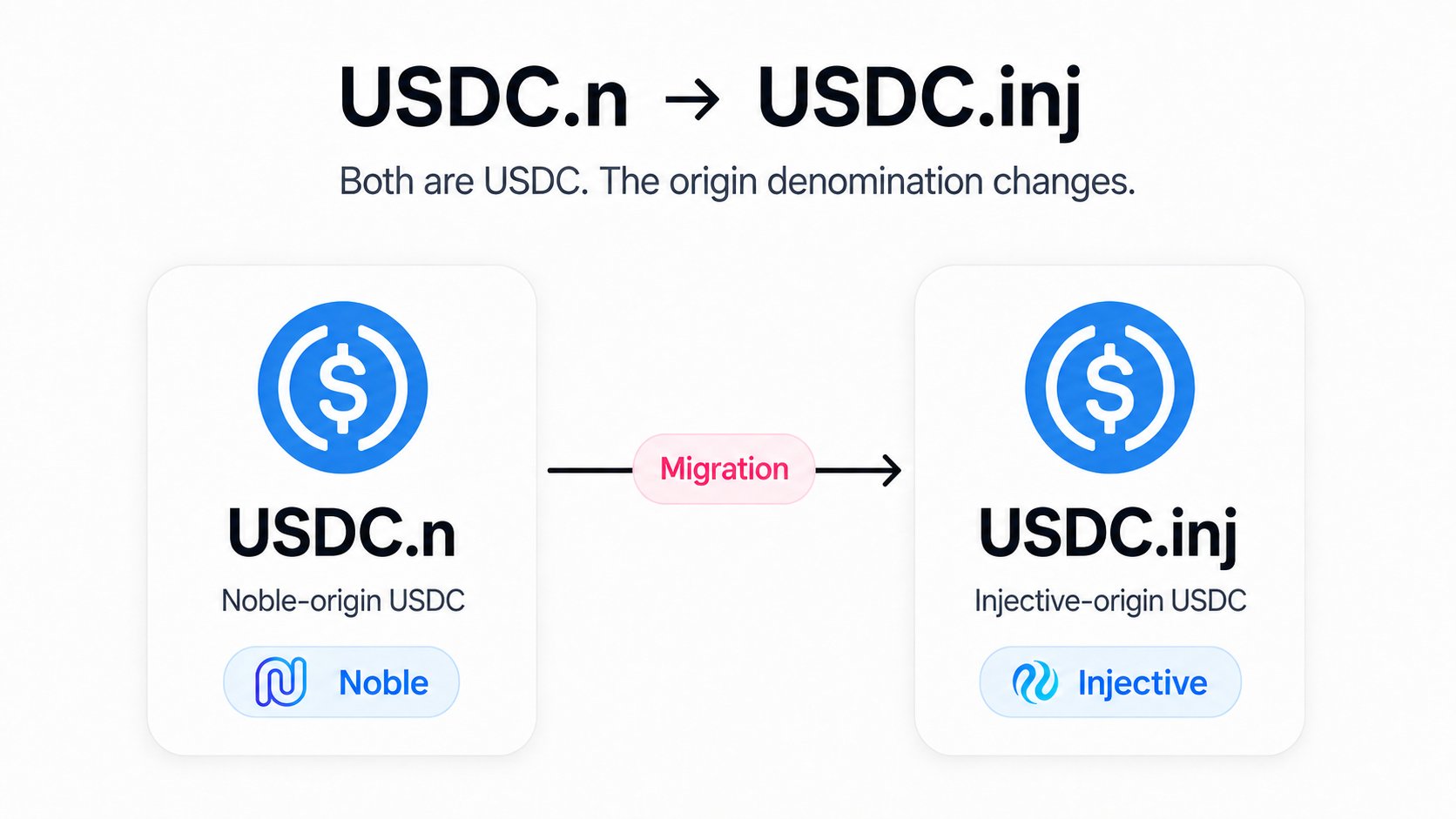 **USDC.n is being deprecated** and will no longer be the supported version of USDC on the chains covered by this guide. If you hold USDC.n, you should migrate it to **USDC.inj**, the version that will be supported going forward.
### What are the differences between USDC.n and USDC.inj?
Both are USDC, but they originate from different chains and are treated as separate assets on Cosmos chains.
* **USDC.n:** USDC originating from Noble
* **USDC.inj:** USDC originating from Injective
***
## What happens when you migrate
**USDC.n is being deprecated** and will no longer be the supported version of USDC on the chains covered by this guide. If you hold USDC.n, you should migrate it to **USDC.inj**, the version that will be supported going forward.
### What are the differences between USDC.n and USDC.inj?
Both are USDC, but they originate from different chains and are treated as separate assets on Cosmos chains.
* **USDC.n:** USDC originating from Noble
* **USDC.inj:** USDC originating from Injective
***
## What happens when you migrate
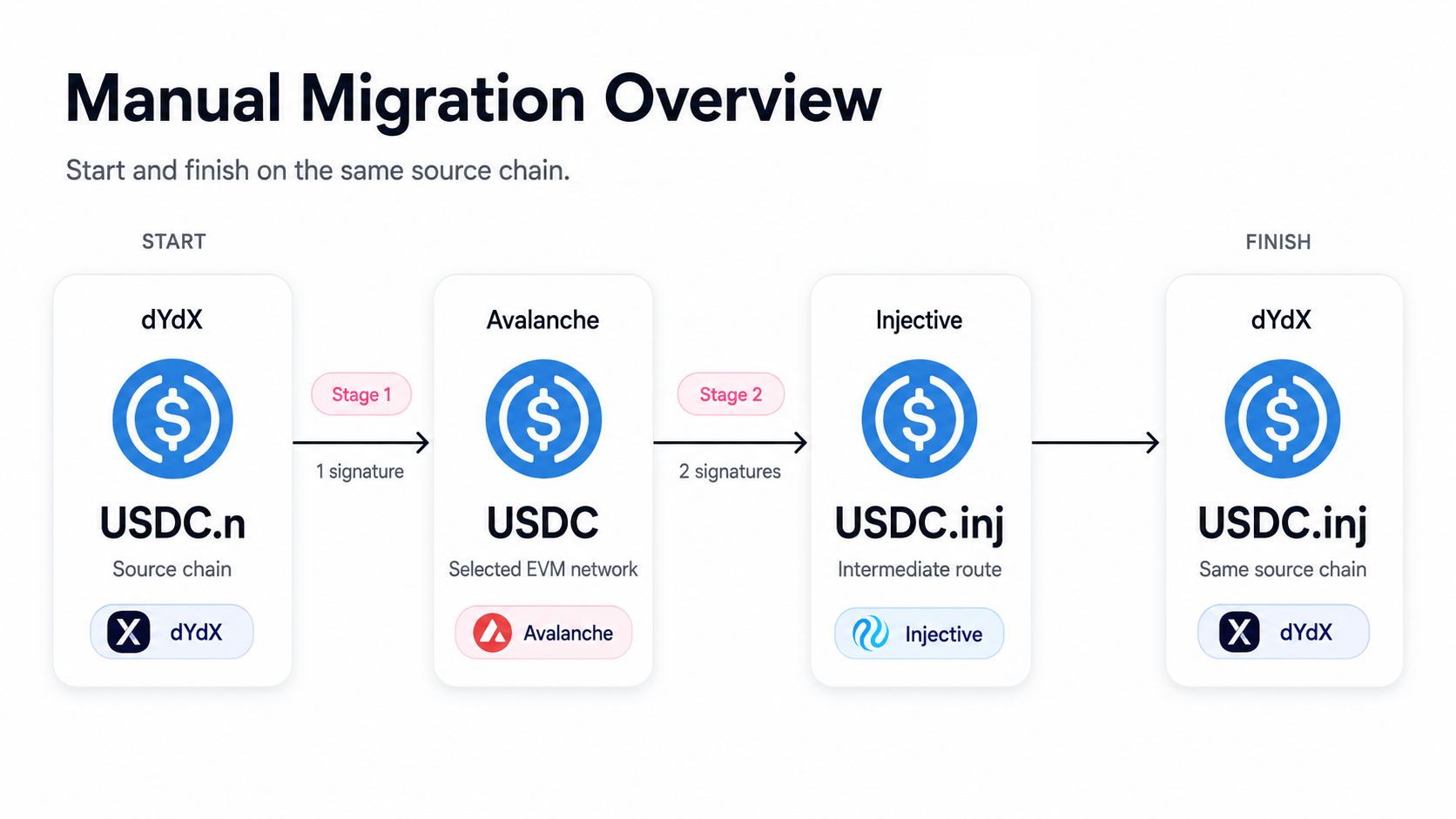 After the migration, you will have **USDC.inj on the same chain where you started**.
For example:
`dYdX USDC.n → dYdX USDC.inj`
Skip:Go routes the migration through Injective. You do not need to send your funds to Injective manually.
***
## Who this guide applies to
This guide applies to USDC.n held on:
* dYdX, Cosmos Hub, Osmosis, Terra, Neutron, ZIGChain
If your USDC.n is on a chain not listed above, check whether **Skip:Go provides a route to transfer it to one of the supported chains listed above**. If a route is available, transfer your USDC.n to that chain first, then follow this migration guide.
If no supported route is available, contact the team responsible for your chain.
**For chain teams:** See [What if my USDC.n is on a chain not listed above?](#what-if-my-usdc-n-is-on-a-chain-not-listed-above) in the FAQ below for the requirements and process to add support.
**dYdX users**
This guide applies only to USDC.n held in your **dYdX Chain wallet**.
It does not apply to USDC in a **dydx.trade trading subaccount**. Follow the official dYdX migration instructions for that balance when they become available.
***
## What to do
Manual migration will be available starting **August 28, 2026**.
A simpler one-step migration is planned for **Mid-September, 2026**.
| Details | Manual migration | One-step migration |
| ----------------------------------- | ------------------------------------------------- | ----------------------------------- |
| Availability | **From August 28, 2026** | **Planned for mid-September, 2026** |
| Migration stages | 2 | 1 |
| Wallet signatures | 3 | 2 |
| Networks requiring transaction fees | Source chain, selected EVM network, and Injective | Source chain only |
The signature counts above only cover the migration itself and exclude any transactions needed to
obtain fee tokens.
***
## Before you start
The manual migration has **two stages**:
**Stage 1:** USDC.n on your source chain → USDC on an EVM network
**Stage 2:** EVM USDC → Injective → USDC.inj on the chain where you started
This guide uses **dYdX** as the source chain and **Avalanche** as the EVM network.
If your USDC.n is on another supported source chain, select that chain instead. The overall migration flow is the same.
**Stay safe**
Use only the official Skip:Go site at **go.skip.build**. Never share your seed or recovery phrase.
### 1. Prepare gas
After the migration, you will have **USDC.inj on the same chain where you started**.
For example:
`dYdX USDC.n → dYdX USDC.inj`
Skip:Go routes the migration through Injective. You do not need to send your funds to Injective manually.
***
## Who this guide applies to
This guide applies to USDC.n held on:
* dYdX, Cosmos Hub, Osmosis, Terra, Neutron, ZIGChain
If your USDC.n is on a chain not listed above, check whether **Skip:Go provides a route to transfer it to one of the supported chains listed above**. If a route is available, transfer your USDC.n to that chain first, then follow this migration guide.
If no supported route is available, contact the team responsible for your chain.
**For chain teams:** See [What if my USDC.n is on a chain not listed above?](#what-if-my-usdc-n-is-on-a-chain-not-listed-above) in the FAQ below for the requirements and process to add support.
**dYdX users**
This guide applies only to USDC.n held in your **dYdX Chain wallet**.
It does not apply to USDC in a **dydx.trade trading subaccount**. Follow the official dYdX migration instructions for that balance when they become available.
***
## What to do
Manual migration will be available starting **August 28, 2026**.
A simpler one-step migration is planned for **Mid-September, 2026**.
| Details | Manual migration | One-step migration |
| ----------------------------------- | ------------------------------------------------- | ----------------------------------- |
| Availability | **From August 28, 2026** | **Planned for mid-September, 2026** |
| Migration stages | 2 | 1 |
| Wallet signatures | 3 | 2 |
| Networks requiring transaction fees | Source chain, selected EVM network, and Injective | Source chain only |
The signature counts above only cover the migration itself and exclude any transactions needed to
obtain fee tokens.
***
## Before you start
The manual migration has **two stages**:
**Stage 1:** USDC.n on your source chain → USDC on an EVM network
**Stage 2:** EVM USDC → Injective → USDC.inj on the chain where you started
This guide uses **dYdX** as the source chain and **Avalanche** as the EVM network.
If your USDC.n is on another supported source chain, select that chain instead. The overall migration flow is the same.
**Stay safe**
Use only the official Skip:Go site at **go.skip.build**. Never share your seed or recovery phrase.
### 1. Prepare gas
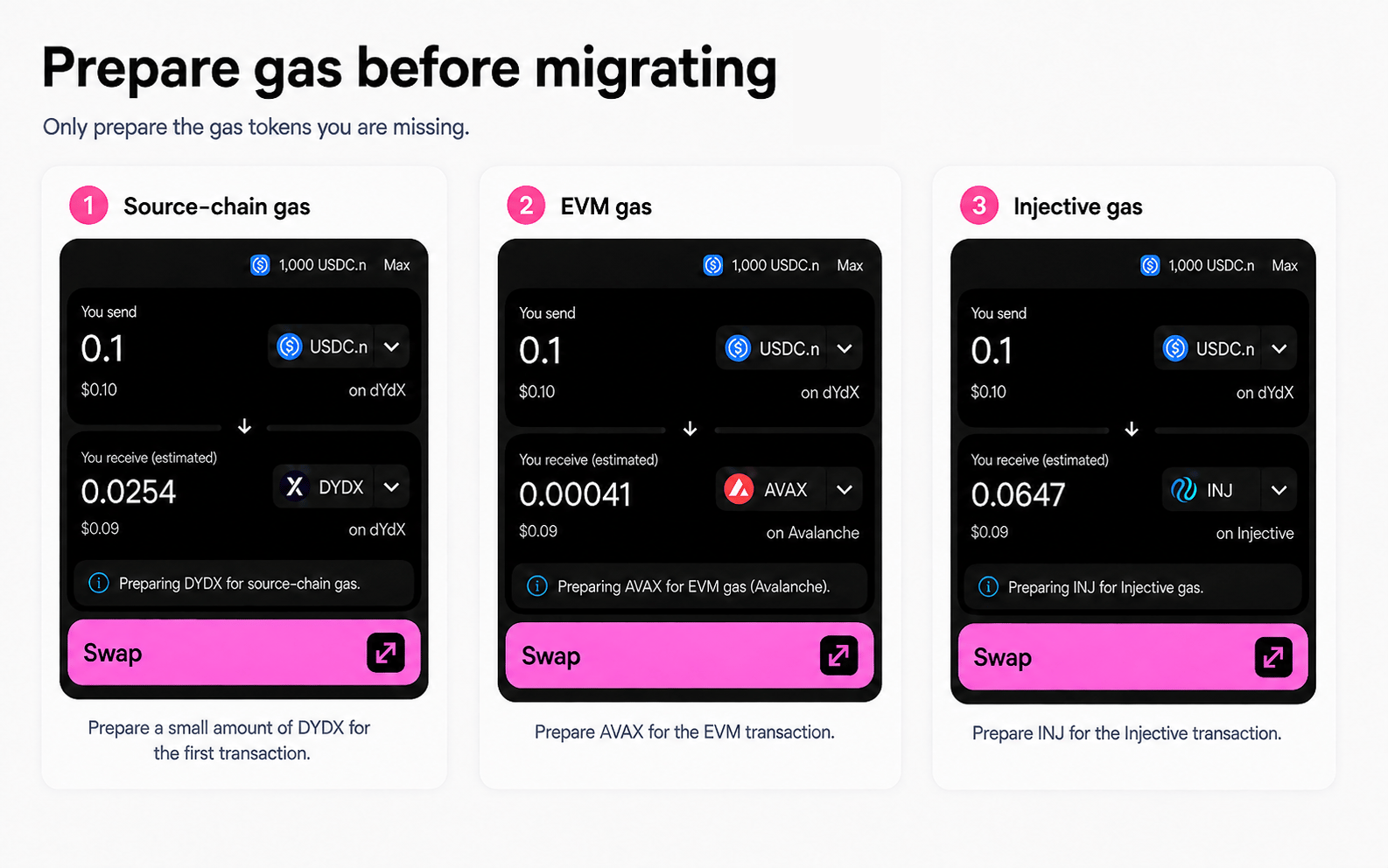 The manual migration requires transaction fees on **three networks**:
1. Your **source chain**
2. Your selected **EVM network**
3. **Injective**
Make sure you have the required fee tokens on all three networks before starting.
#### Source chain
Keep approximately **\$0.10 worth of a supported fee token** on the chain where your USDC.n is held.
| Source chain | Common fee token |
| ------------ | ---------------- |
| dYdX | DYDX |
| Cosmos Hub | ATOM |
| Osmosis | OSMO |
| Terra | LUNA |
| Neutron | NTRN |
| ZIGChain | ZIG |
#### EVM network
You also need gas on the EVM network used for the migration.
| EVM network | Gas token | Approx. fee per transaction | Recommended gas balance |
| ------------- | --------- | --------------------------- | ----------------------- |
| **Avalanche** | AVAX | **\~\$0.01** | **\~\$0.10** |
| Optimism | ETH | \~\$0.10 | **\~\$0.50** |
| Base | ETH | \~\$0.23 | **\~\$1.00** |
| Arbitrum | ETH | \~\$0.37 | **\~\$1.00** |
| Polygon | POL | \~\$0.43 | **\~\$1.00** |
| Ethereum | ETH | \~\$0.70 | **\~\$3.00** |
You can use another supported EVM network if you prefer or already have gas there.
#### Injective
You need **INJ** to pay the Injective transaction fee in Stage 2.
| Gas token | Approx. fee per transaction | Recommended gas balance |
| --------- | --------------------------- | ------------------------- |
| INJ | \~0.0025 INJ (\~\$0.01) | **\~\$0.10 worth of INJ** |
Fees are estimates and may vary with network conditions. Recommended balances include extra
buffer.
### 2. Check your wallets and addresses
Before starting, make sure you can access:
* The wallet holding your **USDC.n**
* A wallet on your selected **EVM network**
* An **Injective address with INJ** for gas
* An address on your original source chain to receive **USDC.inj**
Your source and destination addresses may be in the same wallet, and the same wallet may support more than one of these networks.
This guide uses **Keplr** for dYdX and Injective. For the EVM network, use a wallet supported by Skip:Go.
Select each address from a wallet that supports that network. Do not manually convert one address
format into another.
***
## Stage 1: Move USDC.n to an EVM network
**dYdX USDC.n → Avalanche USDC**
* **Wallet signatures:** 1
* **Estimated time:** Up to 6 minutes
The manual migration requires transaction fees on **three networks**:
1. Your **source chain**
2. Your selected **EVM network**
3. **Injective**
Make sure you have the required fee tokens on all three networks before starting.
#### Source chain
Keep approximately **\$0.10 worth of a supported fee token** on the chain where your USDC.n is held.
| Source chain | Common fee token |
| ------------ | ---------------- |
| dYdX | DYDX |
| Cosmos Hub | ATOM |
| Osmosis | OSMO |
| Terra | LUNA |
| Neutron | NTRN |
| ZIGChain | ZIG |
#### EVM network
You also need gas on the EVM network used for the migration.
| EVM network | Gas token | Approx. fee per transaction | Recommended gas balance |
| ------------- | --------- | --------------------------- | ----------------------- |
| **Avalanche** | AVAX | **\~\$0.01** | **\~\$0.10** |
| Optimism | ETH | \~\$0.10 | **\~\$0.50** |
| Base | ETH | \~\$0.23 | **\~\$1.00** |
| Arbitrum | ETH | \~\$0.37 | **\~\$1.00** |
| Polygon | POL | \~\$0.43 | **\~\$1.00** |
| Ethereum | ETH | \~\$0.70 | **\~\$3.00** |
You can use another supported EVM network if you prefer or already have gas there.
#### Injective
You need **INJ** to pay the Injective transaction fee in Stage 2.
| Gas token | Approx. fee per transaction | Recommended gas balance |
| --------- | --------------------------- | ------------------------- |
| INJ | \~0.0025 INJ (\~\$0.01) | **\~\$0.10 worth of INJ** |
Fees are estimates and may vary with network conditions. Recommended balances include extra
buffer.
### 2. Check your wallets and addresses
Before starting, make sure you can access:
* The wallet holding your **USDC.n**
* A wallet on your selected **EVM network**
* An **Injective address with INJ** for gas
* An address on your original source chain to receive **USDC.inj**
Your source and destination addresses may be in the same wallet, and the same wallet may support more than one of these networks.
This guide uses **Keplr** for dYdX and Injective. For the EVM network, use a wallet supported by Skip:Go.
Select each address from a wallet that supports that network. Do not manually convert one address
format into another.
***
## Stage 1: Move USDC.n to an EVM network
**dYdX USDC.n → Avalanche USDC**
* **Wallet signatures:** 1
* **Estimated time:** Up to 6 minutes
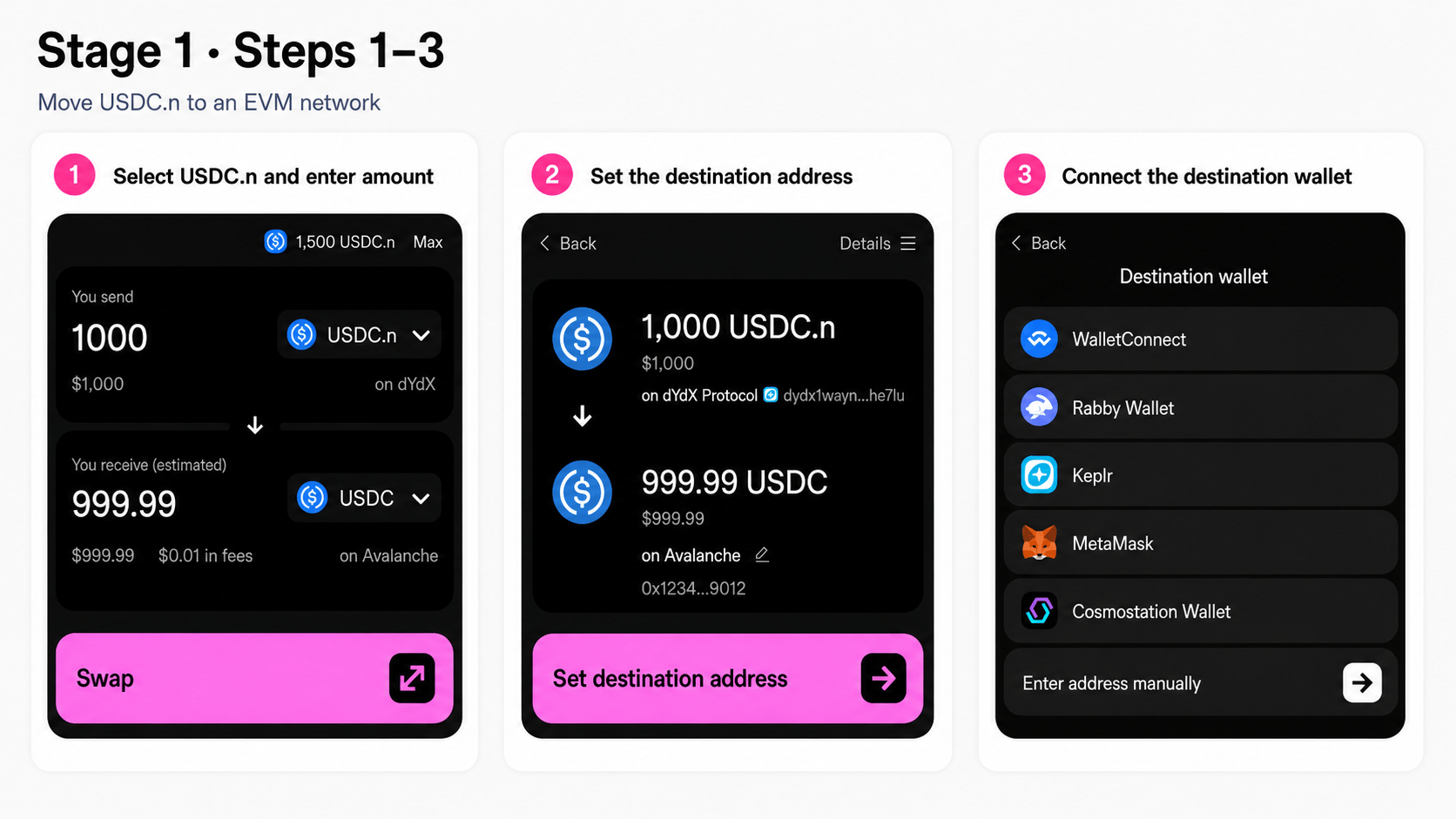 Open [Skip:Go](https://go.skip.build/) and connect the wallet holding your USDC.n.
Select:
* **From:** dYdX / USDC.n
* **To:** Avalanche / USDC
Enter the amount you want to migrate.
Select **Swap** to continue.
Skip:Go uses its standard **Swap** interface here, even though this step is part of the USDC.n migration.
Select **Set destination address**.
Select the wallet that controls your Avalanche address.
Confirm the destination address before continuing.
Open [Skip:Go](https://go.skip.build/) and connect the wallet holding your USDC.n.
Select:
* **From:** dYdX / USDC.n
* **To:** Avalanche / USDC
Enter the amount you want to migrate.
Select **Swap** to continue.
Skip:Go uses its standard **Swap** interface here, even though this step is part of the USDC.n migration.
Select **Set destination address**.
Select the wallet that controls your Avalanche address.
Confirm the destination address before continuing.
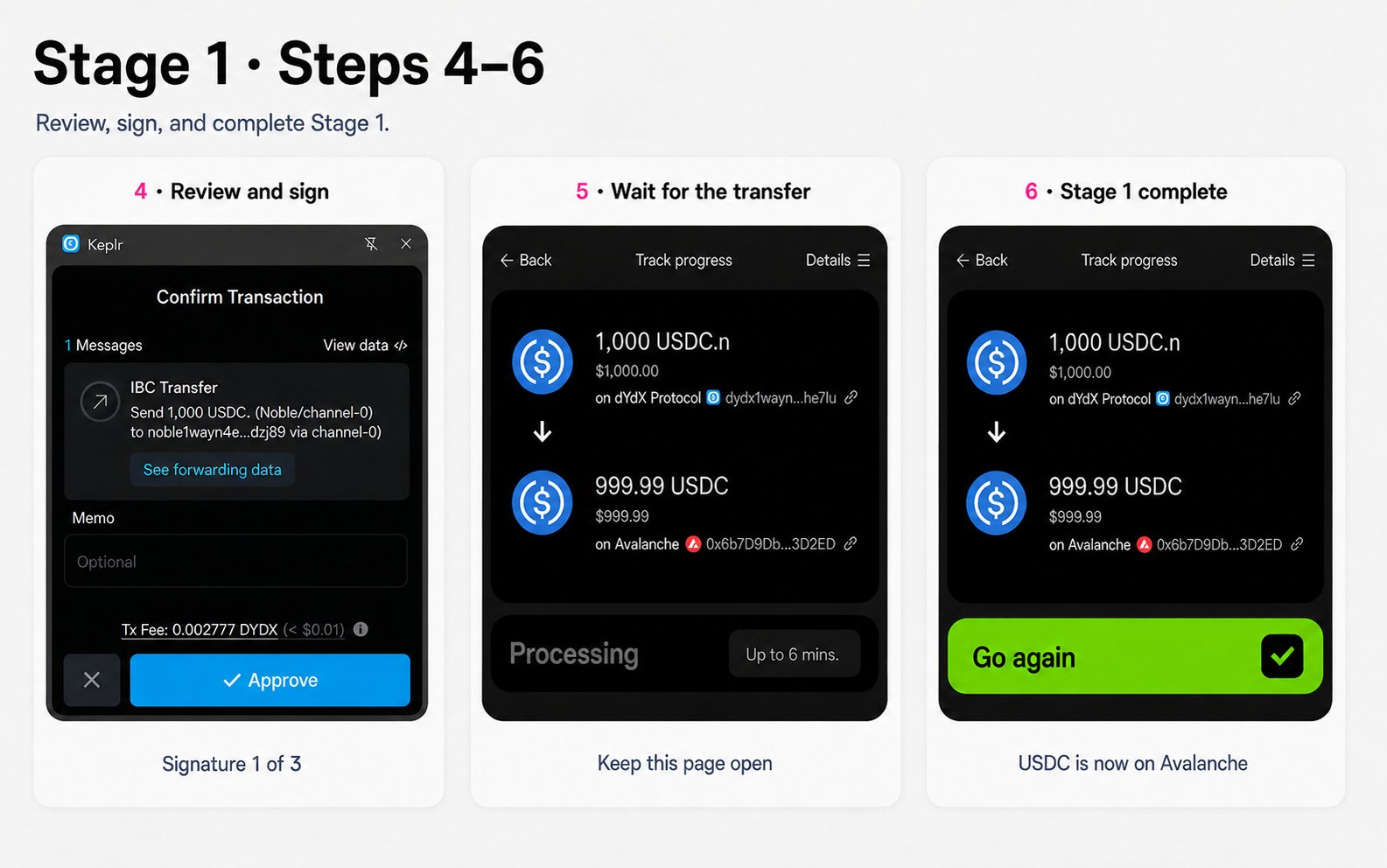 Check:
* **From:** dYdX / USDC.n
* **To:** Avalanche / USDC
* **Amount**
* **Destination address**
Approve the transaction in your source wallet.
**Signature 1 of 3**
Skip:Go will track the transfer automatically.
**Keep this page open** while the transfer is in progress.
When Skip:Go displays **Go again**, Stage 1 is complete.
Your USDC is now on Avalanche.
Continue to **Stage 2** to migrate it to **USDC.inj on your original source chain**.
***
## Stage 2: Move EVM USDC to USDC.inj on your source chain
**Avalanche USDC → Injective → dYdX USDC.inj**
* **Wallet signatures:** 2
Check:
* **From:** dYdX / USDC.n
* **To:** Avalanche / USDC
* **Amount**
* **Destination address**
Approve the transaction in your source wallet.
**Signature 1 of 3**
Skip:Go will track the transfer automatically.
**Keep this page open** while the transfer is in progress.
When Skip:Go displays **Go again**, Stage 1 is complete.
Your USDC is now on Avalanche.
Continue to **Stage 2** to migrate it to **USDC.inj on your original source chain**.
***
## Stage 2: Move EVM USDC to USDC.inj on your source chain
**Avalanche USDC → Injective → dYdX USDC.inj**
* **Wallet signatures:** 2
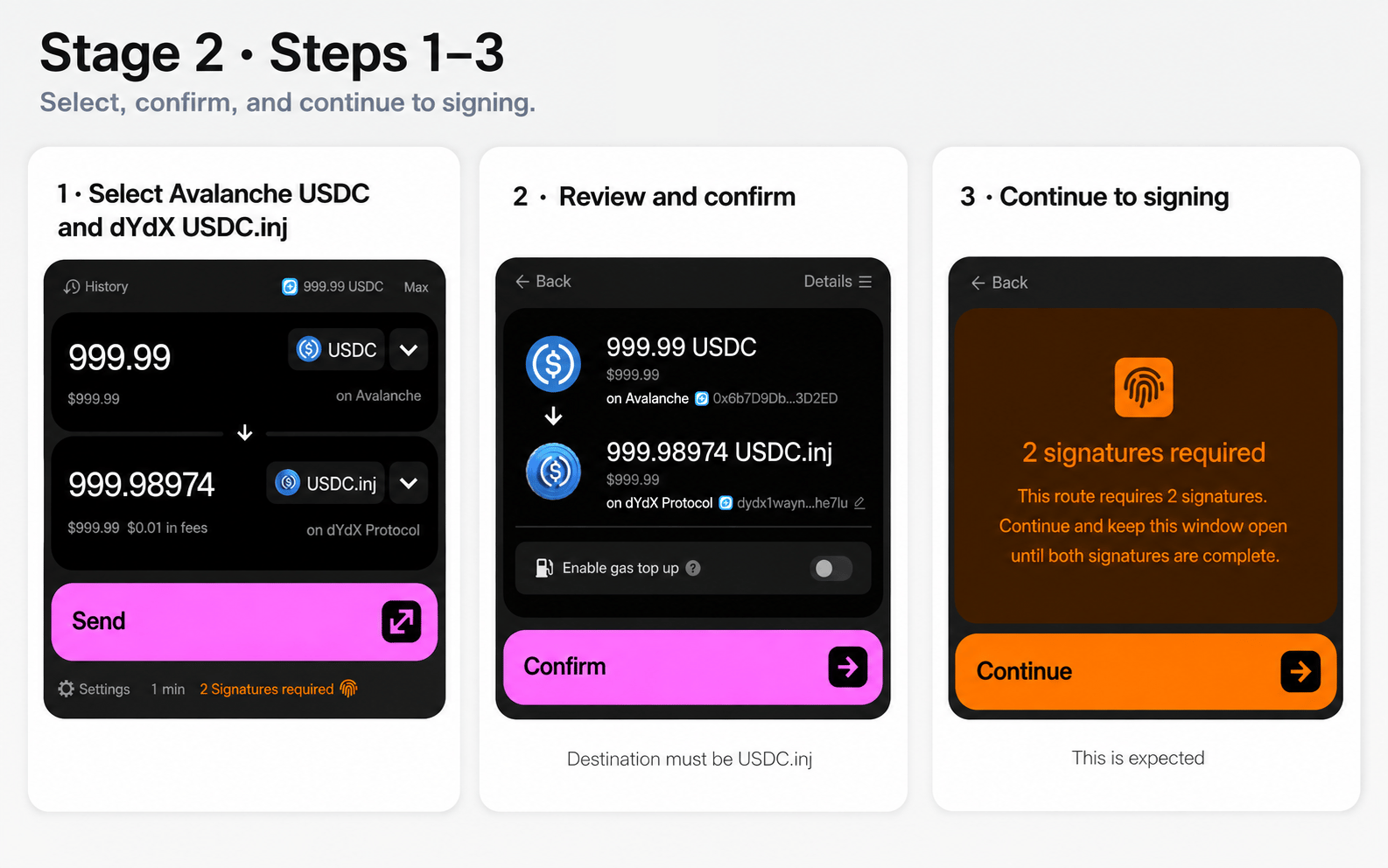 In Skip:Go, select:
* **From:** Avalanche / USDC
* **To:** dYdX / USDC.inj
Enter the amount you want to migrate.
If your migration started on another supported source chain, select that **same chain** as the destination.
Make sure the destination asset is **USDC.inj**, not USDC.n.
Check:
* **From:** Avalanche / USDC
* **To:** dYdX / USDC.inj
* **Amount**
* **Destination address**
Select **Confirm**.
Skip:Go will display **2 signatures required**.
Select **Continue** and keep the window open until both signatures are complete.
In Skip:Go, select:
* **From:** Avalanche / USDC
* **To:** dYdX / USDC.inj
Enter the amount you want to migrate.
If your migration started on another supported source chain, select that **same chain** as the destination.
Make sure the destination asset is **USDC.inj**, not USDC.n.
Check:
* **From:** Avalanche / USDC
* **To:** dYdX / USDC.inj
* **Amount**
* **Destination address**
Select **Confirm**.
Skip:Go will display **2 signatures required**.
Select **Continue** and keep the window open until both signatures are complete.
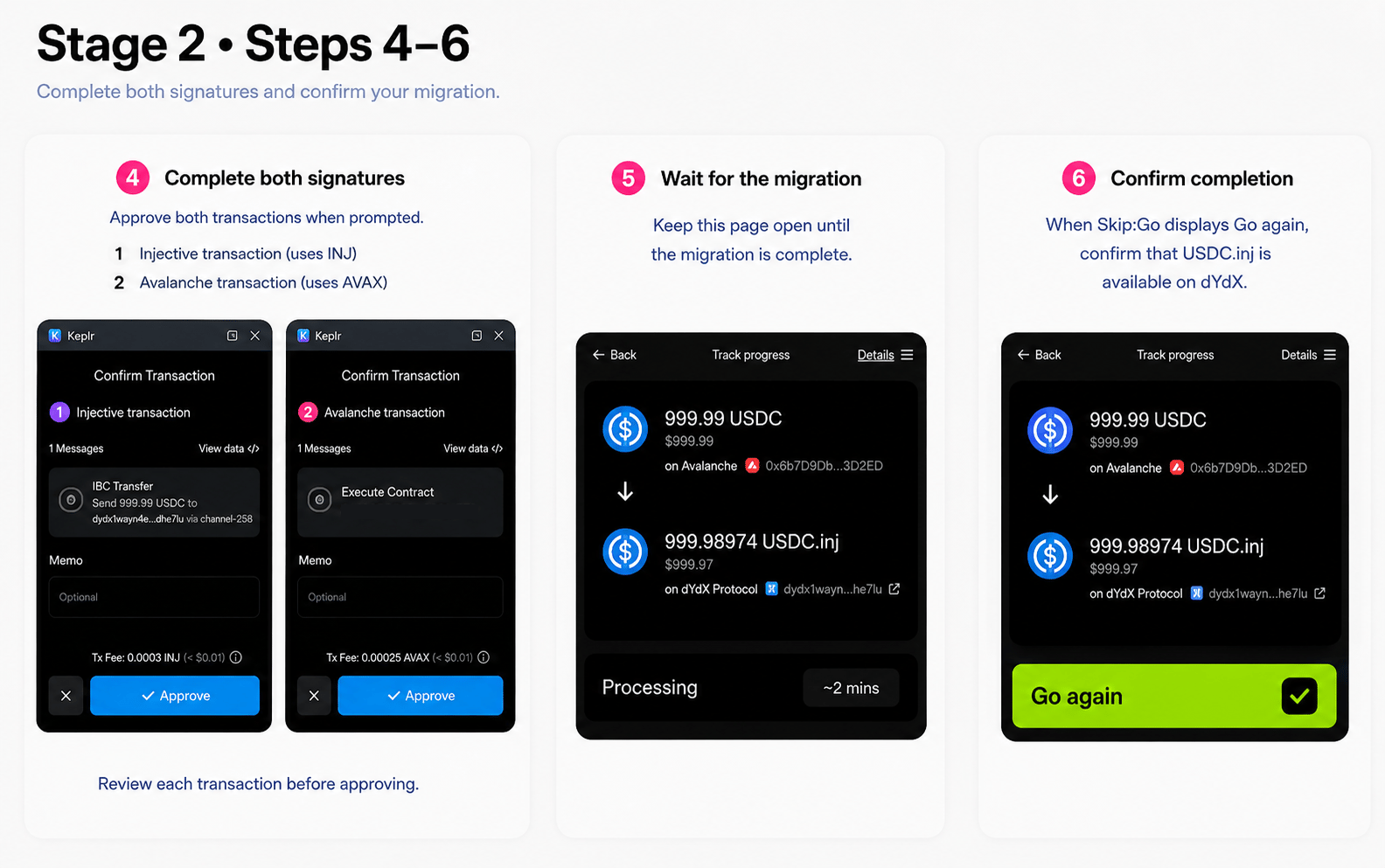 Approve both transactions when prompted:
1. **Injective transaction** → uses INJ for the transaction fee
2. **Avalanche transaction** → uses AVAX for the transaction fee
Review each transaction before approving it.
After both transactions are approved, Skip:Go will process the migration.
**Keep this page open** while the migration is in progress.
When Skip:Go displays **Go again**, the migration is complete.
Confirm that **USDC.inj is available on dYdX**.
**Migration complete:**
`dYdX USDC.n → dYdX USDC.inj`
***
## FAQ
Only if you also hold **USDC.n directly in your dYdX Chain wallet**.
Do not use this guide for USDC in a **dydx.trade trading subaccount**. Follow the official dYdX migration instructions for that balance when they become available.
You can resume the migration later.
* **After Stage 1:** Your USDC remains on the EVM network you selected. You can start Stage 2 later using that USDC.
* **During Stage 2 signing:** Both signatures are required before Stage 2 proceeds. If you stop before completing both signatures, your USDC remains on the EVM network. You can start Stage 2 again when you are ready.
For example, if you use Avalanche, your USDC remains on **Avalanche** until Stage 2 proceeds.
This guide is specifically for migrating your balance from **USDC.n to USDC.inj**.
Skip:Go may display **Swap** in parts of the interface because the same interface is also used for swaps and cross-chain transfers.
Swapping USDC.n for another token, such as DYDX, AVAX, or INJ, is a separate transaction and is not part of this migration.
No. **Mid-September is the planned launch date for the one-step migration, not a migration deadline.**
Manual migration will be available starting **August 28, 2026**. You can use the manual flow or wait for the one-step migration planned for mid-September.
No.
This guide uses Avalanche as an example; you can use any supported EVM network.
If you choose another network, make sure you have the required gas token before you start.
If your USDC.n is on a chain not listed above, check whether **Skip:Go provides a route to transfer your USDC.n to one of the supported chains listed above**. If a route is available, transfer your USDC.n to that supported chain first, then follow this migration guide.
If no supported route is available, contact the team responsible for your chain.
**For chain teams:** A direct IBC path with Injective is required to support your chain as a USDC.inj destination, including **IBC light clients, an ICS-20 transfer channel, and at least one reliable relayer**.
If you need help meeting these requirements and already have a Skip contact, work with them for guidance and assistance.
Once the IBC connection and relaying are operational, use your existing contact with Skip or submit a **Chain Integration Request** to request support for your chain as a USDC.inj destination on Skip:Go.
## Official references
* [Circle: Now Available: USDC and CCTP on Injective](https://www.circle.com/blog/now-available-native-usdc-cctp-on-injective) — Circle's announcement of USDC and CCTP support on Injective.
* [Injective: Injective USDC will be Adopted by Cosmos and dYdX as the Canonical Stablecoin Standard](https://injective.com/blog/inj-usdc-coming-soon-cosmos-dydx) — Background on the transition to Injective-origin USDC and Skip:Go's adoption of Injective USDC.
* [Noble: A New Noble World](https://noble.xyz/blog/a-new-noble-world) — Noble's long-term plan for its existing Cosmos SDK chain.
* [dYdX: Accounts and Subaccounts](https://docs.dydx.xyz/concepts/trading/accounts) — How dYdX separates on-chain accounts from subaccounts used for trading.
* [Skip:Go: Supported Ecosystems and Bridges](https://docs.skip.build/go/general/supported-ecosystems-and-bridges) — Supported ecosystems and cross-chain routing information.
* [Skip:Go: Getting Fee Info](https://docs.skip.build/go/general/fee-info) — Skip:Go fee types and fee information.
Approve both transactions when prompted:
1. **Injective transaction** → uses INJ for the transaction fee
2. **Avalanche transaction** → uses AVAX for the transaction fee
Review each transaction before approving it.
After both transactions are approved, Skip:Go will process the migration.
**Keep this page open** while the migration is in progress.
When Skip:Go displays **Go again**, the migration is complete.
Confirm that **USDC.inj is available on dYdX**.
**Migration complete:**
`dYdX USDC.n → dYdX USDC.inj`
***
## FAQ
Only if you also hold **USDC.n directly in your dYdX Chain wallet**.
Do not use this guide for USDC in a **dydx.trade trading subaccount**. Follow the official dYdX migration instructions for that balance when they become available.
You can resume the migration later.
* **After Stage 1:** Your USDC remains on the EVM network you selected. You can start Stage 2 later using that USDC.
* **During Stage 2 signing:** Both signatures are required before Stage 2 proceeds. If you stop before completing both signatures, your USDC remains on the EVM network. You can start Stage 2 again when you are ready.
For example, if you use Avalanche, your USDC remains on **Avalanche** until Stage 2 proceeds.
This guide is specifically for migrating your balance from **USDC.n to USDC.inj**.
Skip:Go may display **Swap** in parts of the interface because the same interface is also used for swaps and cross-chain transfers.
Swapping USDC.n for another token, such as DYDX, AVAX, or INJ, is a separate transaction and is not part of this migration.
No. **Mid-September is the planned launch date for the one-step migration, not a migration deadline.**
Manual migration will be available starting **August 28, 2026**. You can use the manual flow or wait for the one-step migration planned for mid-September.
No.
This guide uses Avalanche as an example; you can use any supported EVM network.
If you choose another network, make sure you have the required gas token before you start.
If your USDC.n is on a chain not listed above, check whether **Skip:Go provides a route to transfer your USDC.n to one of the supported chains listed above**. If a route is available, transfer your USDC.n to that supported chain first, then follow this migration guide.
If no supported route is available, contact the team responsible for your chain.
**For chain teams:** A direct IBC path with Injective is required to support your chain as a USDC.inj destination, including **IBC light clients, an ICS-20 transfer channel, and at least one reliable relayer**.
If you need help meeting these requirements and already have a Skip contact, work with them for guidance and assistance.
Once the IBC connection and relaying are operational, use your existing contact with Skip or submit a **Chain Integration Request** to request support for your chain as a USDC.inj destination on Skip:Go.
## Official references
* [Circle: Now Available: USDC and CCTP on Injective](https://www.circle.com/blog/now-available-native-usdc-cctp-on-injective) — Circle's announcement of USDC and CCTP support on Injective.
* [Injective: Injective USDC will be Adopted by Cosmos and dYdX as the Canonical Stablecoin Standard](https://injective.com/blog/inj-usdc-coming-soon-cosmos-dydx) — Background on the transition to Injective-origin USDC and Skip:Go's adoption of Injective USDC.
* [Noble: A New Noble World](https://noble.xyz/blog/a-new-noble-world) — Noble's long-term plan for its existing Cosmos SDK chain.
* [dYdX: Accounts and Subaccounts](https://docs.dydx.xyz/concepts/trading/accounts) — How dYdX separates on-chain accounts from subaccounts used for trading.
* [Skip:Go: Supported Ecosystems and Bridges](https://docs.skip.build/go/general/supported-ecosystems-and-bridges) — Supported ecosystems and cross-chain routing information.
* [Skip:Go: Getting Fee Info](https://docs.skip.build/go/general/fee-info) — Skip:Go fee types and fee information.